
Introduction to Parsers
A respective parser is needed to show the measured values of the integrated devices human-readable directly in the ZENNER Datahub. Therefore, the correct parser must be assigned to all the devices, either directly when creating them or also afterwards. We show you how to do this exactly in the following.
Assign Parser to ZENNER Devices
When new ZENNER/Minol devices are added to the Datahub, usually the correct parser “ZENNERUSA” is assigned automatically. If this is not the case for some reason, follow one of the approaches below to assign a parser to third-party devices.
Assign Parser to Third-Party Devices
When third-party devices are added to the Datahub, usually the correct parser must be assigned manually to the respective device. As previously mentioned, there are two ways to assign a parser to a device:
Assign Parser during Device Creation
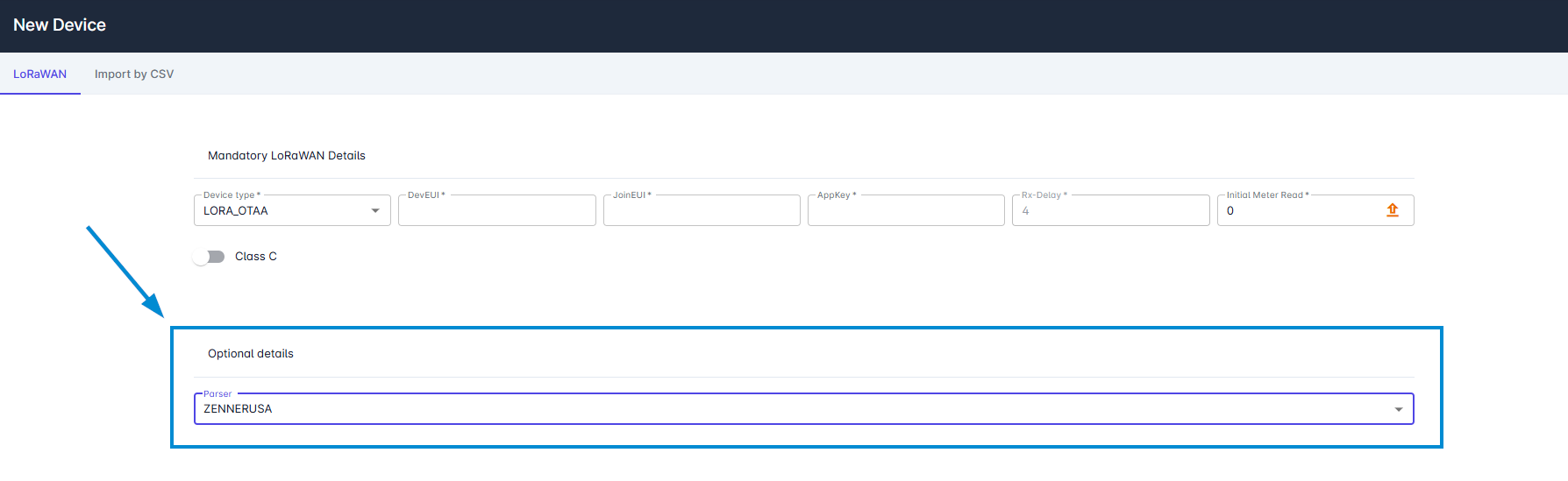
To assign a parser directly during the creation of a new device, simply use the respective parser drodown under “Optional details”.
Assign Parser via Device Editing
If the parser has not been assigned directly during its creation, it can be assigned also afterwards by editing a device in the same way as described above.